Canonical Tag Checker
What is Canonical Tag and why is it important? Canonical Tag, also known as Canonical URL, is a tag that helps identify the original or "canonical" version of a web page. This tag is important for SEO because it tells search engines which version of a page to rank in search results. When implemented correctly, the Canonical Tag can help prevent duplicate content issues and improve rankings for your website.
Lock in 50% off for life.
SEOGraphy is live. Subscribe before 31 October and keep 50% off for the lifetime of your plan - the discount never expires, the offer does.
What is a canonical tag, and why do you need it
Canonical tags are used to tell search engines which version of a piece of content is the "master" copy. This is helpful when there is duplicate content on your site or if different pages have very similar content.
Canonical tags can be a bit confusing, but understanding them is important if you want your website to rank well in search engines. Let's take a closer look at what canonical tags are and why they're important for SEO.

A canonical tag (sometimes called a "rel canonical" tag) is an HTML element that tells search engines which version of a piece of content is the original, or "canonical," version. Canonical tags are used to solve the problem of duplicate content on the internet.
For example, let's say you have a blog post that gets republished on another website. The other website includes a link back to your original blog post. Both versions of the content are exactly the same, except for the fact that one version has a canonical tag pointing to the other.
In this case, the canonical tag tells search engines, "Hey, this content is duplicated, but the original version is on THIS website." This helps search engines understand which website should get credit for the content, and it also helps to prevent your content from being penalized for being duplicate content.
Canonical tags are important because they help search engines understand which version of a piece of content is the original. They also help to prevent your content from being penalized for being duplicate content. If you have identical or very similar pieces of content on your website, be sure to use canonical tags to avoid any potential SEO penalties.
How to add a canonical tag to your website
If you're using WordPress, a few plugins can help you add canonical tags to your website. Yoast SEO is one popular option. Once you install and activate the plugin, you can find the Canonical URL settings under "SEO" → and "Advanced."
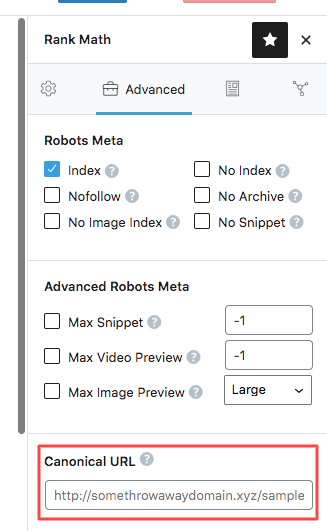
If you're not using WordPress, you'll need to edit your website's code to add canonical tags. This is generally a pretty simple process, but it will vary depending on which content management system (CMS) you're using.
Adding a canonical tag is usually as simple as adding a line of code to the header of your web page. Once you add the code, be sure to save your changes and republish your web page.
And that's it! You've successfully added a canonical tag to your website. Remember, canonical tags are important for SEO, so be sure to use them if you have identical or very similar pieces of content on your site.
What happens if you don't use a canonical tag
Not using a canonical tag can result in search engine penalties for duplicate content. If you have identical or very similar pieces of content on your website, be sure to use canonical tags to avoid any potential SEO penalties.
Want automated blog posts too?
SEOGraphy writes SEO-optimised articles, generates images, and publishes to WordPress - automatically.
Start Free - No Credit Card